
What to Do in the First Hour of a Cyber Attack: A Plain-English Guide for Business Owners
You’ve just realised something is wrong.
Maybe files aren’t opening the way they should. Maybe a message has appeared on screen that looks alarming. Maybe a supplier has called to say they’ve received a suspicious email from your address. Maybe your accountant has noticed something odd.
Whatever the trigger, your stomach has dropped, and you’re now in that peculiar limbo between “this might be nothing” and “this might be very serious.”
What you do in the next sixty minutes will have a disproportionate effect on how this whole thing plays out. Not because the stakes are artificially inflated, but because the first hour is genuinely when you have the most control over the situation. After that, your options start to narrow.
The good news is that there’s a clear, logical sequence of steps. None of them require technical expertise. Most of them require you to slow down rather than speed up.
This is that sequence.
First: Understand Why the First Hour Matters So Much
Emergency medicine has a concept called the “golden hour” the period immediately after a serious injury when prompt action has the greatest impact on outcome. Cyber incident response has its own version of this.
In the first hour, there’s still a reasonable chance of containing whatever is happening before it spreads further. Malware that’s been on one computer for twenty minutes is a different problem from malware that’s been spreading across a network for three hours. A compromised email account that’s been identified quickly can be secured before significant damage is done.
After the first hour, things tend to get more complicated. Malware can propagate. Attackers who realise they’ve been spotted can accelerate. Evidence gets overwritten. Stakeholders start forming their own theories about what’s happening and why.
The first hour is not the complete response. It’s the foundation that the rest of the response is built on.
The Most Important Mindset Shift
Before the steps, there’s something more fundamental.
Every instinct you have in the first few minutes is going to push you toward action. Do something. Fix it. Get things back to normal. This is understandable, you’re a business owner, you solve problems, that’s what you do. But in a cyber incident, the wrong action taken quickly causes significantly more damage than a measured response taken slightly more slowly.
Four Things Not To Do in the First Hour
These four mistakes are consistent enough that they’re worth naming clearly before anything else.
Don’t try to clean or repair infected systems yourself. Modern malware is designed to survive basic cleanup attempts. Trying to fix it often destroys evidence and leaves components active that you can’t see.
Don’t restore from backup immediately. If the backup itself is compromised, sophisticated ransomware specifically targets backup systems first, you’ll just restore the problem. Check that the backup is clean before touching it.
Don’t make public statements before you understand what’s happened. A panicked social media post causes more reputational damage than most incidents.
Don’t play the blame game. Who clicked what link is a question for the post-incident review, not the crisis itself. It wastes time and makes people defensive and less helpful when you need them most.
What you’re aiming for is the mindset shift from “this can’t be happening” to “this is happening, what’s the next logical step?” Structure is your ally here.
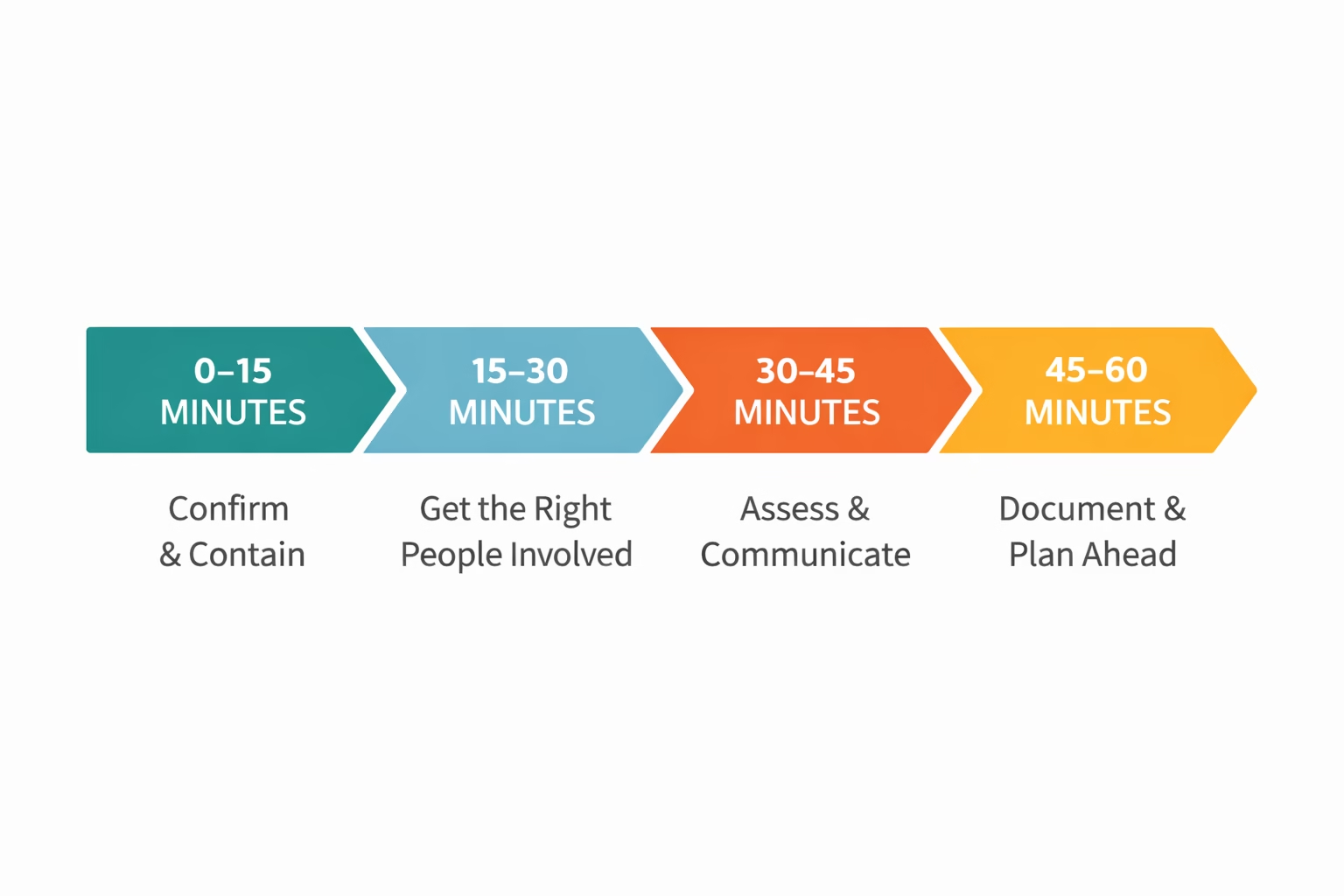
The First 15 Minutes: Confirm and Contain
Step 1: Confirm You're Actually Dealing with an Incident
Not every technical problem is a cyber attack. Slow systems, files that won’t open, login failures, these can all have mundane explanations and they more often than not do in my experience. A brief, unbiased assessment of whether what you’re seeing looks deliberately caused or just broken is worthwhile before you escalate.
Ask yourself is this affecting more than one system? Is there anything unusual, messages you don’t recognise, file names that have changed, accounts acting strangely? Has anyone recently clicked a link in an unexpected email or installed something? You’re not investigating yet, just establishing whether this looks like an IT problem or something more deliberate.
Step 2: Disconnect — Don't Switch Off
If you have reasonable grounds to think you’re dealing with a cyber incident, the priority is stopping it spreading. Unplug the network cable from affected machines. If connected wirelessly, turn off the Wi-Fi on that device.
Do not switch the machine completely off unless a specialist specifically tells you to. Turning a machine off can destroy evidence that exists only in the device’s active memory and you may need that evidence for insurance or investigation purposes.
Critically do not delete anything. Whatever you can see, the error messages, unusual files, ransom notes are all evidence.
Step 3: Photograph What You Can See
This takes thirty seconds and can matter enormously later. Use your phone to photograph any error messages, ransom notes, or unusual screens right now, before anything changes. These images can support your insurance claim, your regulatory notification, and any forensic investigation.
Minutes 15 to 30: Get the Right People Involved
Step 4: Call Your IT Support
Now is the time to escalate. Call, don’t email. Give a clear, brief, factual summary of what you’re seeing and what you’ve done. If your IT support is not a cyber security specialist, or you don’t have an IT support contract, call your cyber insurance helpline directly, they can direct you to approved incident response specialists.
Step 5: Brief Key Internal People — Calmly and Factually
Your immediate team needs to know what’s happening. Keep it brief: “We’re investigating a potential security issue affecting [specific systems]. Please avoid [affected systems] until further notice. We’ll update everyone at [specific time].”
Be explicit about what staff should not do. Don’t try to fix it themselves, don’t discuss it on social media, don’t make commitments to customers or suppliers about timescales.
Regular, scheduled updates, even when there’s little new to report, prevent anxiety and demonstrate that someone is in control.
Minutes 30 to 45: Assess and Communicate
Step 6: Assess the Broader Business Impact
Which functions are affected? Can customers still be served? Are financial systems accessible? Is personal data, customer details, staff records, contact information potentially involved? This drives what you need to communicate externally and whether any regulatory obligations have been triggered.
Step 7: Check Your Regulatory Position
In the UK, if personal data is potentially involved, the 72-hour notification clock to the Information Commissioner’s Office starts from when you become aware a breach may have occurred, not when you can prove it. You don’t need to file a formal notification in the first hour. You do need to flag internally that the clock may be running.
The 72-hour window begins when you become aware. Not when you’ve confirmed all the details.
Industry-specific obligations, financial services firms, legal practices, healthcare organisations, may have additional requirements beyond this.
Step 8: Contact Your Cyber Insurance Provider
Most policies require early notification as a condition of coverage. Beyond that, your insurer often provides direct access to incident response specialists, legal advisers, and PR support once a claim is registered. Don’t delay this call.
Minutes 45 to 60: Document and Plan Ahead
Step 9: Start a Simple Incident Log
A basic record of what happened, when, what actions were taken, and who was involved is invaluable. Pen and paper is fine and in some respects preferable, since paper works regardless of what your systems are doing. Record the time symptoms were first noticed, what they looked like, who noticed them, every step taken and when, every person or organisation contacted and when. Keep adding to this log throughout the incident.
Step 10: Plan the Next Hour
By now you should have contained the immediate situation, engaged appropriate support, briefed your key people, and started documenting. Now you can ask what additional support do you need? What do customers or suppliers need to hear, and when? What are the key decisions coming in the next few hours?
Set a specific update time for your team and stick to it.
Before You Need This: The Key Contacts You Should Have Ready
One detail that’s easy to overlook until it matters: if this happened right now, do you know who to call and how to reach them? Not on a computer that might be encrypted. Not in an email account you might be locked out of.
Before any of this becomes necessary, write down (and keep somewhere physical):
- The name and emergency number for your Incident Commander — the person who leads your response
- Your IT support — emergency number, not just an email address
- Your cyber insurance — claims helpline number, and your policy number
- Your legal adviser, if you have one
A single sheet of paper, filled in now and kept in a desk drawer, is worth more in a crisis than a comprehensive plan saved on the server that’s currently encrypted.
Your First Hour, in Brief
0–15 minutes: Confirm the incident. Disconnect affected systems from the network. Photograph what you can see.
15–30 minutes: Call IT support (not email — call). Brief key internal people with factual information and a scheduled update time.
30–45 minutes: Assess business impact. Check regulatory position. Contact cyber insurance.
45–60 minutes: Start your incident log — pen and paper is fine. Plan the next hour and set a specific team update time.
The Businesses That Come Through This Best
They’re rarely the ones with the most sophisticated technology or the largest IT budget. They’re the ones who made a few decisions in advance, who to call, what to do first, where the important information is kept and who were able to stay calm and methodical when things got stressful.
A printed checklist in a desk drawer is worth more in a crisis than a comprehensive response plan saved on a server that’s currently encrypted.
Useful Links
Want to make sure you’re actually ready for this? Download the free First Hour Checklist — a plain-English, print-and-keep guide to the first 60 minutes of a cyber incident, built for business owners without in-house IT.
Print it. Laminate it. Keep it somewhere you can find it that isn’t on a system that might be down. No jargon, no fluff. Just what to do, in the order to do it.